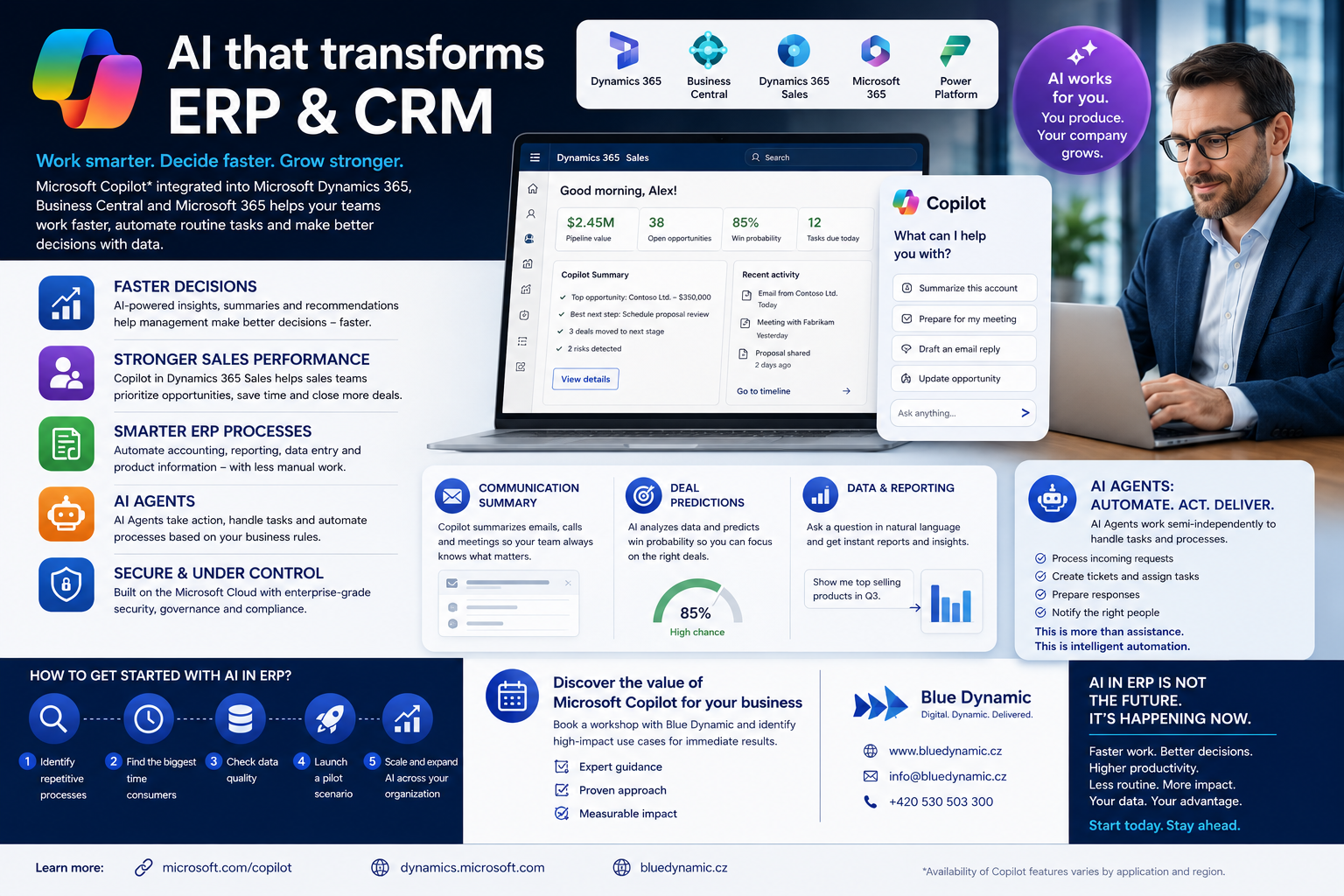
Businesses today are dealing with the same problem — more data, more processes, more communication, but less time. Management expects faster decision-making, business teams want more efficient work, and IT departments are looking for ways to automate routine tasks without complex implementations.
This is where Microsoft Copilot comes into play. AI technology integrated directly into Microsoft Dynamics 365, Business Central and other business applications is beginning to change the way businesses work with ERP and CRM systems.
In collaboration with experts from Blue Dynamic, we created an overview of specific scenarios and use cases where Copilot and AI Agents can bring immediate value.
How is Microsoft Copilot changing ERP and CRM systems?
Until a few years ago, work in ERP system mainly meant:
- manual data entry,
- search for information,
- long reports,
- rewriting emails,
- administration.
Today, the situation is changing rapidly. Microsoft Copilot leverages generative AI right inside Dynamics 365 to help users work faster, more accurately, and more efficiently.
This is not a futuristic “sometime in the future” technology. A number of functions already work in the environment today:
- Microsoft Dynamics 365,
- Business Central,
- Dynamics 365 Sales,
- Microsoft 365,
- Power Platforms.
What does Copilot bring to management?
For CEOs and management, the biggest benefit is simple: faster decision-making over data.
Instead of a complex search in reports, management can work with natural language AI assistance.
For example:
- “Which customers have the highest decline in turnover? “
- “What business opportunities have the best chance of closing? “
- “Let me summarize the most important changes in the last month. “
Copilot can:
- summarize data,
- create reports,
- generate analyses,
- Recommend the next steps.
This results in faster data orientation and less time spent on manual administration.
Dynamics 365 Sales: AI for business teams
One of the strongest scenarios is the use of Copilot in Dynamics 365 Sales. The Blue Dynamic workshop showed several practical use cases directly from the business process.
Automatic Communication Summary
Traders often spend hours:
- by reading emails,
- Preparing meetings,
- by taking notes,
- CRM updates.
The co-pilot can:
- summarize communication with the customer,
- Prepare a meeting summary,
- suggest a reply to the email,
- Automatically update CRM data.
This means more time for the trade itself.
Business Opportunity Prediction
AI can analyze:
- history of communication,
- customer activity,
- previous trades,
- probability of closing the deal.
Thus, both management and sales teams get a better prioritization of business activities.
Business Central and ERP Automation
Copilot also offers great opportunities in the ERP area.
According to the documents prepared by the Blue Dynamic team, there are a number of situations where AI helps solve everyday operational problems more efficiently.
Examples of use in ERP
Automation of accounting processes
Copilot can help:
- with the pairing of documents,
- by generating captions,
- data control,
- suggestions for repairs.
Creation of product descriptions
AI can generate:
- product descriptions,
- marketing texts,
- categorization of items.
Data analysis and reporting
Instead of manual work in Excel, the user can enter a simple query:
“Create a report of the best selling products for Q3. “
And the system will prepare the output automatically.
AI Agents: The Next Step of Corporate Automation
In addition to the classic Copilot, AI Agents are also increasingly being talked about.
What's the difference?
Co-pilot
It helps the user during work.
Agenti AI
It works partly independently on the basis of defined rules.
For example:
- process the incoming request,
- create a ticket,
- assigns a task,
- prepare a response,
- notifies the merchant.
It's not just an assist anymore. This is partially autonomous process automation.
And this is where companies are starting to see huge potential.
What do IT managers do?
IT departments today often stand between two pressures:
- Business wants innovation.
- IT must provide security and control.
Microsoft Copilot has the advantage of being part of the Microsoft ecosystem:
- Azure,
- Microsoft 365,
- Dynamics 365,
- Power Platforms.
This means:
- Better governance,
- safety,
- permission management,
- easier integration.
But at the same time, AI is not “plug and play”.
As stated in the workshop documentation, some features are still in development and not all scenarios are fully implemented.
Therefore, it is important:
- correctly define use cases,
- start with a pilot project,
- to test the real benefits
- Involve business and IT.
Where to start with AI in ERP?
Companies often make the mistake of wanting to automate everything at once.
A better way is:
- Identify recurrent processes.
- Find the biggest time losses.
- Verify the quality of the data.
- Deploy a pilot script.
- Gradually expand AI automation.
It is workshops and consultations that help determine where the return on investment will be the fastest.
AI in ERP is no longer the future
Microsoft Copilot shows that AI can be a practical tool for the day-to-day work of management, marketers and IT teams.
It's not just a technology trend. The point is:
- faster work,
- Better decision making,
- increased productivity,
- less routine,
- more efficient use of company data.
Companies that start working with AI today will get a significant head start.
FAQ
Is Microsoft Copilot available in Dynamics 365?
Yes, select Copilot features are already available in Dynamics 365 and Business Central. However, the range of functionalities varies depending on the specific application and version.
Is Copilot also suitable for medium-sized companies?
Yes. It is the medium-sized companies that often get the fastest benefits through the automation of routine processes.
Is AI replacing employees?
The No. Copilot acts as an assistance to help employees work faster and more efficiently.
How long does it take to implement?
It depends on the scope of the solution. Pilot scenarios can often be prepared in a matter of weeks.
What next?
Want to find out where Microsoft Copilot can help your business?
👉 Schedule a workshop where we motivate your people to use Copilot “correctly” - Blue Dynamic
👉 Test Copilot AI capabilities in Dynamics 365
👉 Identify processes suitable for automation