Thank you! We'll get back to you within two business days.
Something went wrong. Please try again or email us at hello@bluedynamic.cz.
Business Consultants
Adriana Pricop & Štěpán Kněžek
We'll get back to you within two business days.
/
article
/
3 Steps to Improve Your WMS Warehouse Performance in MS Dynamics AX
Published:
20.5.2020
WMS gives us the freedom to model logistics processes.
With the arrival of new WMS functionality in Microsoft Dynamics AX, entirely new possibilities have opened up for using Microsoft Dynamics AX in warehouse management. The new WMS tool is highly flexible, which gives us enormous freedom in modeling logistics processes.
That high flexibility, however, demands a certain discipline and adherence to certain rules — otherwise it can become a burden, and the end result shows up only as slowly crawling warehouse processes.
To help you get the absolute most out of your WMS, here are 3 tips for improving WMS performance in Microsoft Dynamics AX.
Tip 1: Detailed logging only when you really need it
WMS generally consists of two tasks: pick something up (Pick), and take it somewhere else (put it down – PUT).
As you probably know, the basic entity in the new WMS is "Work"; this entity generally consists of two tasks: pick something up (Pick) and take it somewhere else (PUT). The generation of these tasks is driven directly by the "Location Directives" and "Work Templates" rules.
One of the great tools for diagnosing whether all your logistics processes are configured correctly is precisely the detailed logging of how the system walks through (evaluates) the rules created for generating work.
This log is called the "Work Creation History Log." Step by step, this log records information about how each individual work item was created.
So this log is very important while you're building, configuring, and tuning your warehouse processes in the system.
In production, however, we recommend turning off the creation of this log.
You can turn this feature on (or off) very easily from the "Warehouse Management Parameters" menu
Logging has a significant impact on the speed of creating "Work." From our own experience, we know that turning off this log's generation can speed up work creation by as much as 20%. Given the need to generate thousands of "Work" items at the same moment (every morning), that can save you several tens of minutes.
So think about whether you really need this log, or whether you can turn it off.
Tip 2. Go easy on the rules
You may already know that the new WMS functionality in Microsoft Dynamics AXworks based on predefined rules — "Location Directives" and "Work Templates." The combination of these rules determines exactly what a given warehouse process will look like.
While the rules entered in the "Location Directive" tell us the direction — that is, which location we'll pick goods from during outbound processing, or where we'll put them during putaway — the rules entered in "Work Templates" determine what the specific process will look like (whether it will be a one-step or two-step process).
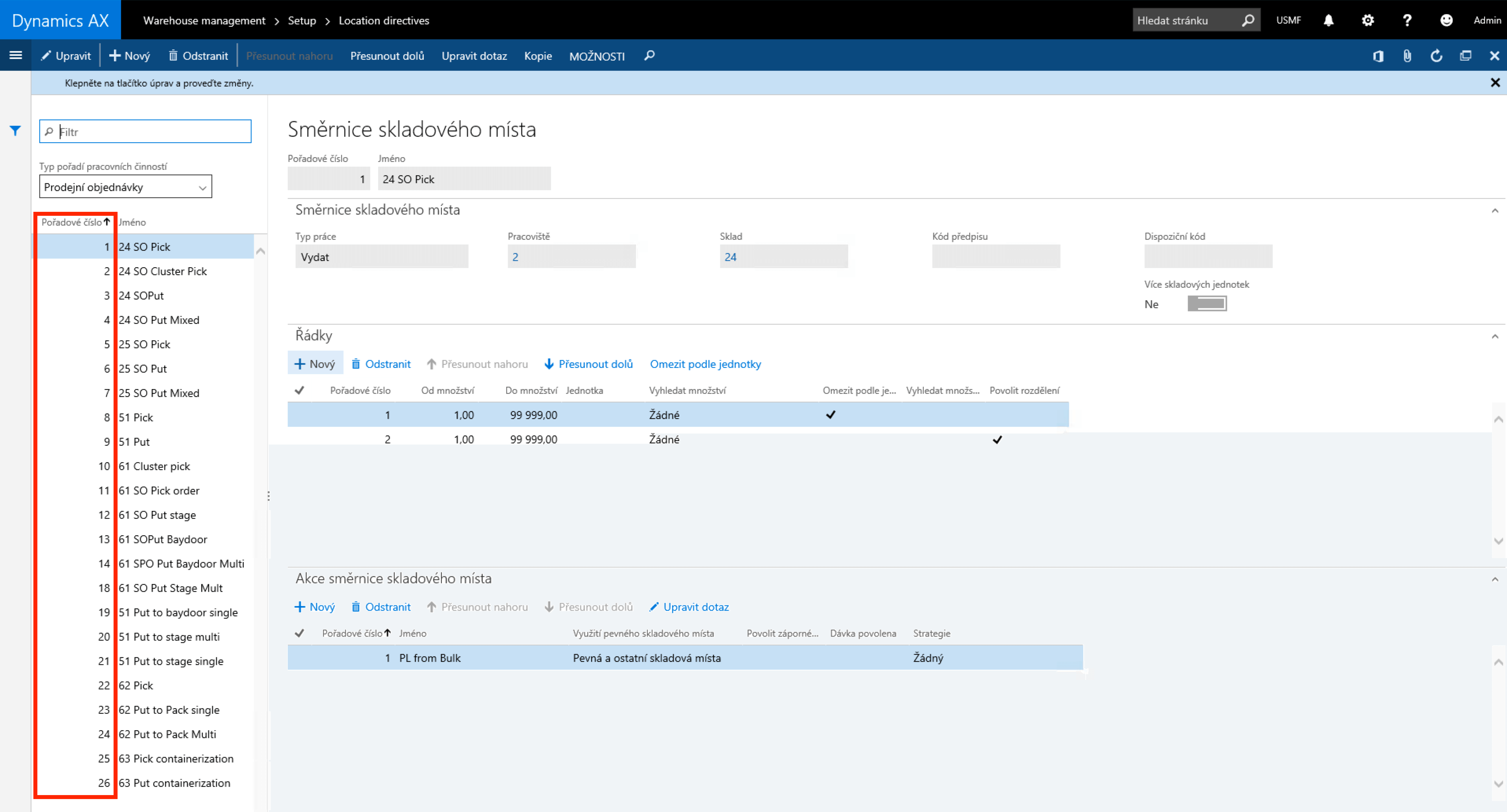
The image below shows a screen from the system with "Location Directive" rules
Notice the highlighted section showing the sequence numbers of the individual rules. These numbers matter for the evaluation logic. The system uses these numbers as priorities and always starts evaluating rules from the lowest number to the highest.
The way the system determines which rule is the "correct" one is by trying to apply the rules one after another until it hits a rule that is "correct"
Evaluation works the same way for "Work Template" rules.
In practice, it's very easy to end up with hundreds of rules created for both "Location Directives" and "Work Templates" — and as a result, the rule you actually need is very likely to end up with a very high sequence number.
Once you realize that the system walks through all the rules starting from the lowest sequence number, a lot of time can pass before it reaches the rule that's the correct one for the process being created.
So it's more than advisable to try to keep the number of "Location Directive" and "Work Template" rules as small as possible. It's important to keep this in mind not just during the initial setup of the application (Dynamics AX implementation) but also during any subsequent changes to warehouse processes.
The fact that the system walks through all the rules is worth keeping in mind as early as when you're building the warehouse map in the system. There are plenty of ways to design a warehouse more efficiently from the system's point of view, which can greatly reduce the total number of "Location Directive" and "Work Template" rules
Tip 3. Stay up to date
You're not alone in this.
It's worth remembering that WMS in Microsoft Dynamics AX is used by a great many customers all over the world.
All of these customers are, in their day-to-day work, most likely running into the same or similar issues — both functional issues and issues related to the performance of the whole solution.
I think it's worth remembering that behind this application stands a software giant, Microsoft. Fortunately, Microsoft listens to its customers and regularly ships patches and updates targeted at exactly the functionality customers struggle with the most.
Microsoft also regularly ships updates and fixes related to application performance.
So it's important to make sure your application has all the current official fixes installed. Trust me — if you keep your application up to date and install all the performance-related fix packages, you'll avoid a lot of problems that could otherwise come up in your day-to-day work with the system.
The most important thing is to make sure the application has all the latest official fixes
You can find a list of current performance-related fixes, for example, on this website.
Jiří Hosenseidl works as a Dynamics AX Consultant at Blue Dynamic.
3 Steps to Improve Your WMS Warehouse Performance in MS Dynamics AX
Let's talk
/ Whether you know exactly what you need or just want to explore opportunities and possibilities.