Thank you! We'll get back to you within two business days.
Something went wrong. Please try again or email us at hello@bluedynamic.cz.
Business Consultants
Adriana Pricop & Štěpán Kněžek
We'll get back to you within two business days.
/
article
/
Sales Process Reporting in Microsoft Dynamics CRM
Published:
20.5.2020
8 tips for making the most of CRM reporting in your business!
This article shows examples of how reporting built on the solution we deliver — Microsoft Dynamics CRM — can support sales, planning, and evaluation of the business process.
The following sections introduce some of the reports most commonly used in Microsoft Dynamics CRM, along with a brief description of each. Naturally, designing more effective reporting for a specific case requires a deeper understanding of that customer's business processes, gained through consultation with selected key staff.
Why use reporting in CRM?
The goal of reporting is to give the sales department and company management relevant information in an easy-to-understand form and to help evaluate and plan business strategy.
Reporting is your assistant — it flags changing trends or weak points in the business process and helps you find a solution.
Turn relationships into revenue. Dynamics 365 Sales lets you build strong customer relationships and improve your sales. With Sales, you stay in control of your business process from order intake, through the sale itself, to running marketing campaigns.
Reporting is part of the Microsoft Dynamics CRM service, used for working with reports
Microsoft Dynamics CRM = CRM tool for supporting sales activity and customer interactions.
Reporting is the part of Microsoft Dynamics CRM used for working with reports. A flexible tool for building custom reports and exporting data and charts to various formats for further analysis.
Marketing is the part of Microsoft Dynamics CRM used for creating marketing activities. It helps you reach the right group of customers in the right way and capture their attention. The customer relationship doesn't end once goods are delivered. Complaints, grievances, and suggestions are all handled in this part of Microsoft Dynamics CRM.
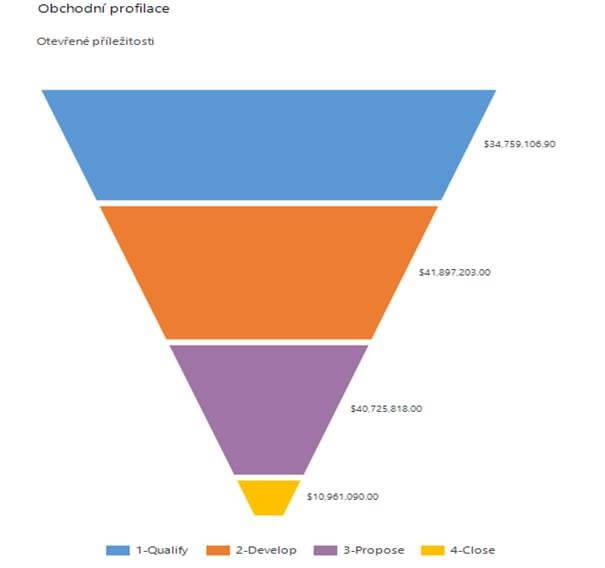
Report 1: Sales profiling
This report is one of the basic reports used in every Microsoft Dynamics CRM system. It gives us a concise, quick overview of the state of open opportunities tracked in Microsoft Dynamics CRM. The goal is to show the current sales outlook and give us a sense of the overall situation.
The report can be adjusted to track metrics other than financial indicators. For example:
Estimated revenue, profit, or cost (see image)
Helps with financial planning
A product view showing open opportunities for individual products
Helps with production planning and inventory management
Report 2: Opportunity overview on a timeline
This report lets you track the history of business opportunities over time. It flags negative or positive trends and can reveal seasonal fluctuations.
The report can be adjusted to track metrics other than financial indicators.
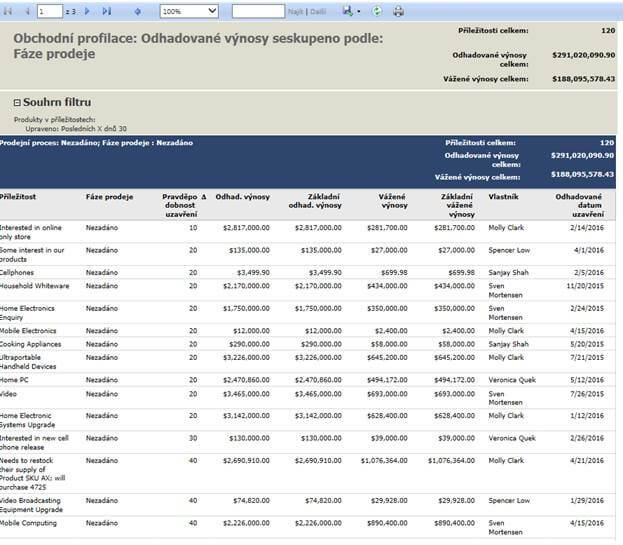
Report 3: Overview of individual sales reps' results
Lets you track the performance of individual sales reps over a given period. It's useful for sales managers — and, understandably, less popular with less productive reps.
The report can be adjusted to track metrics other than financial indicators.
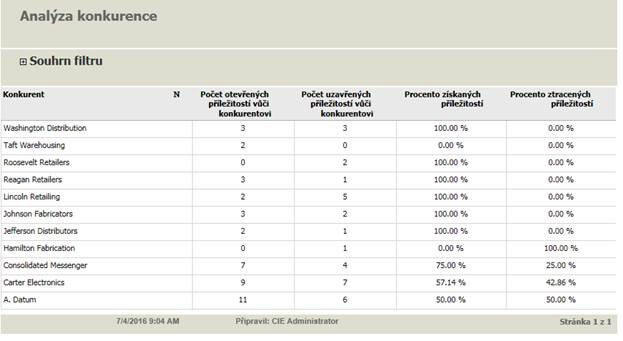
Report 4: Competitor tracking
One of the reports used for tracking the competition. It shows how successful we are against a given competitor.
The information from this report can be used to analyze the situation against a given competitor and answer the question, "why is the competitor winning?"
As always, the report can be customized as needed, or a modified version can be built that displays the data in a different visual form and tracks different metrics.
Suggestion: To keep an eye on the competition, I'd recommend setting up an automatic notification in Microsoft Dynamics CRM sent to the sales director whenever a given competitor is winning, say, more than 50% of opportunities.
Report 5: Neglected business relationships
The purpose of this widely used report is to show an overview of business relationships that haven't been contacted in a while.
Again, the report can be modified as needed to track other metrics.
Suggestion: CRM naturally lets you set up automatic notifications for business relationships that haven't been contacted in a while, with filtering by various criteria and statuses. A setup like that partially replaces the function of this report.
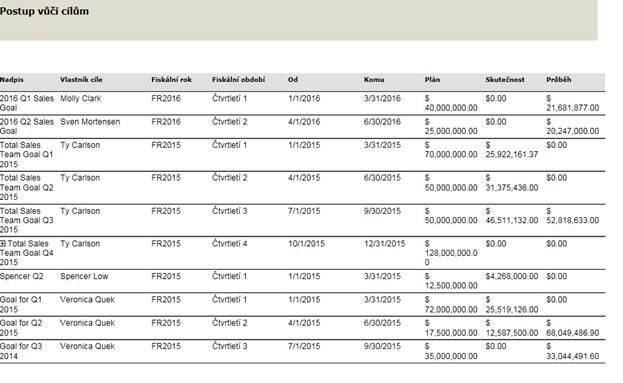
Report 6: Goal tracking
For each period, we can set targets, either for an individual sales rep or for a whole sales team.
This report lets us track progress toward those targets. Of course, the report can also be adjusted to track metrics other than financial indicators.
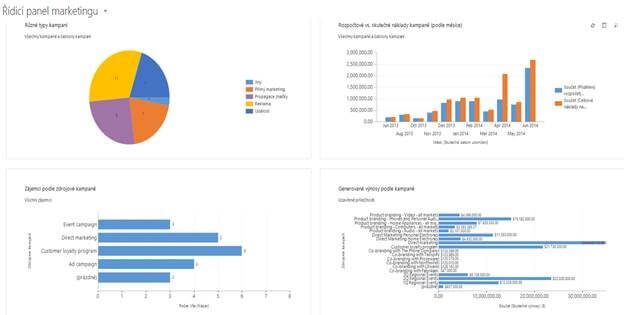
Report 7: Marketing reports
Marketing is a modern way of reaching customers. Since marketing is, in my view, an integral part of the business process — and not just in retail — I'm mentioning it here too, if only briefly.
We put considerable effort into collecting customer data and keeping customer databases up to date. So why not put that data to use and target a specific group of customers with an offer that catches their attention?
In marketing reporting, we track the success of individual campaigns and their cost, but we also collect and evaluate feedback from our customers.
Report 8: Service reports
A customer's journey doesn't end once a product is sold and delivered. That's why I decided to mention this area from a reporting perspective here as well.
A customer may have feedback, or may want to return goods or complain about how they were delivered. The goal of this part of Microsoft Dynamics CRM is to give service staff the tools to respond promptly, stay on top of the current situation, and not forget to resolve a complaint on time.
Reporting can give us both easy-to-read overviews and more detailed reports — for example, looking at the cost of handling complaints.
Microsoft Dynamics CRM makes it easy and fast to respond to customer requests
Suggestion: Service in Microsoft Dynamics CRM lets you set response times (SLAs) individually for each customer, based on their specific contract terms.
Conclusion
The Microsoft Dynamics CRM solution uses a whole range of reports to support the business process, and it also includes a flexible tool for building your own.
In this article I've covered only a handful of the reports our customers use most often.
Making effective use of reporting requires an analysis of your specific needs. Put simply, it comes down to sitting down and talking through your reporting: what and how you want to track, what information would help you in the business process, what information you already have available in Microsoft Dynamics CRM, and what you need to start tracking and recording from scratch.